How To Setup Microsoft Secure Score
Last updated: December 19, 2025
Video Guide
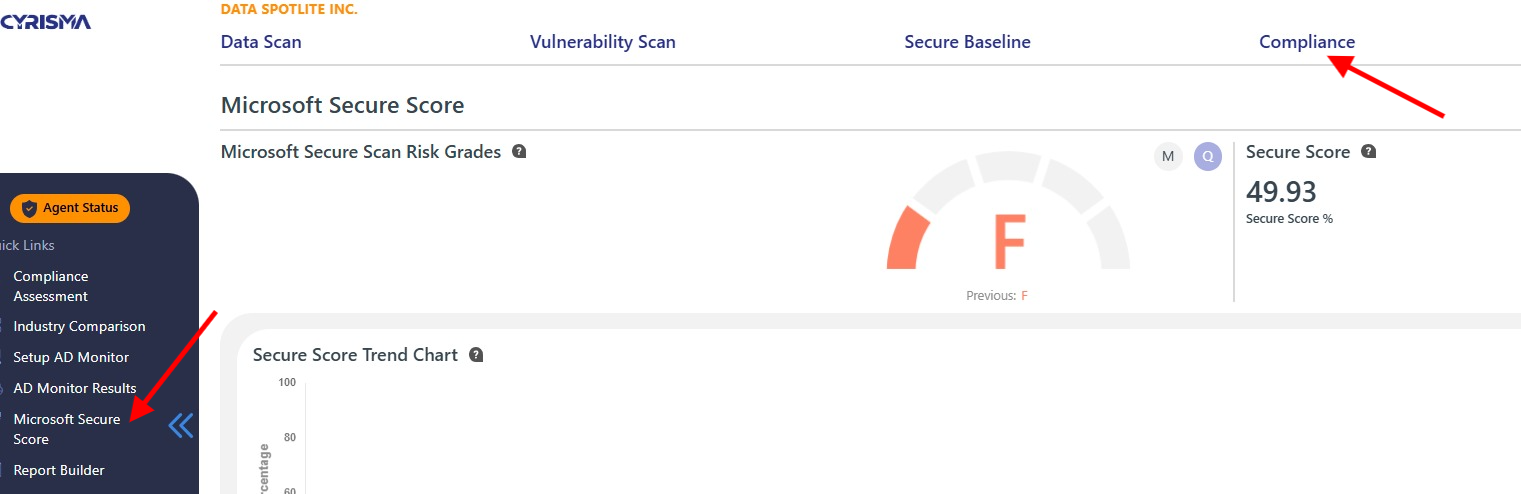
Navigate to Secure Score
Go to the main menu.
Select Compliance > Microsoft Secure Score.
Key Features
Risk Grades
The dashboard displays both your current and previous risk grades, helping you track changes in your Microsoft Cloud environment's security configuration.
Switch between reporting periods by selecting either M (Month) or Q (Quarter) for a comparative view.
Secure Score
View your overall Microsoft Cloud security performance as a percentage, along with the total points achieved out of the possible maximum.
Breakdown by Category
Get an overview of the percentage breakdown for your environment, categorized by Identity, Data, and Apps.
This shows what actions have been completed and what remains to be addressed.
Comparison by Tenant Size and Total Seats
Assess how your organization's security configuration measures up against similar-sized organizations.
This provides context for your secure score and highlights areas for improvement.
Conclusion
By utilizing the Microsoft Secure Score Dashboard, you can effectively monitor and enhance your security posture within the Microsoft Cloud. This tool not only provides valuable metrics but also guides you in making necessary adjustments to safeguard your data and comply with relevant standards.