Vulnerability
Last updated: March 11, 2026
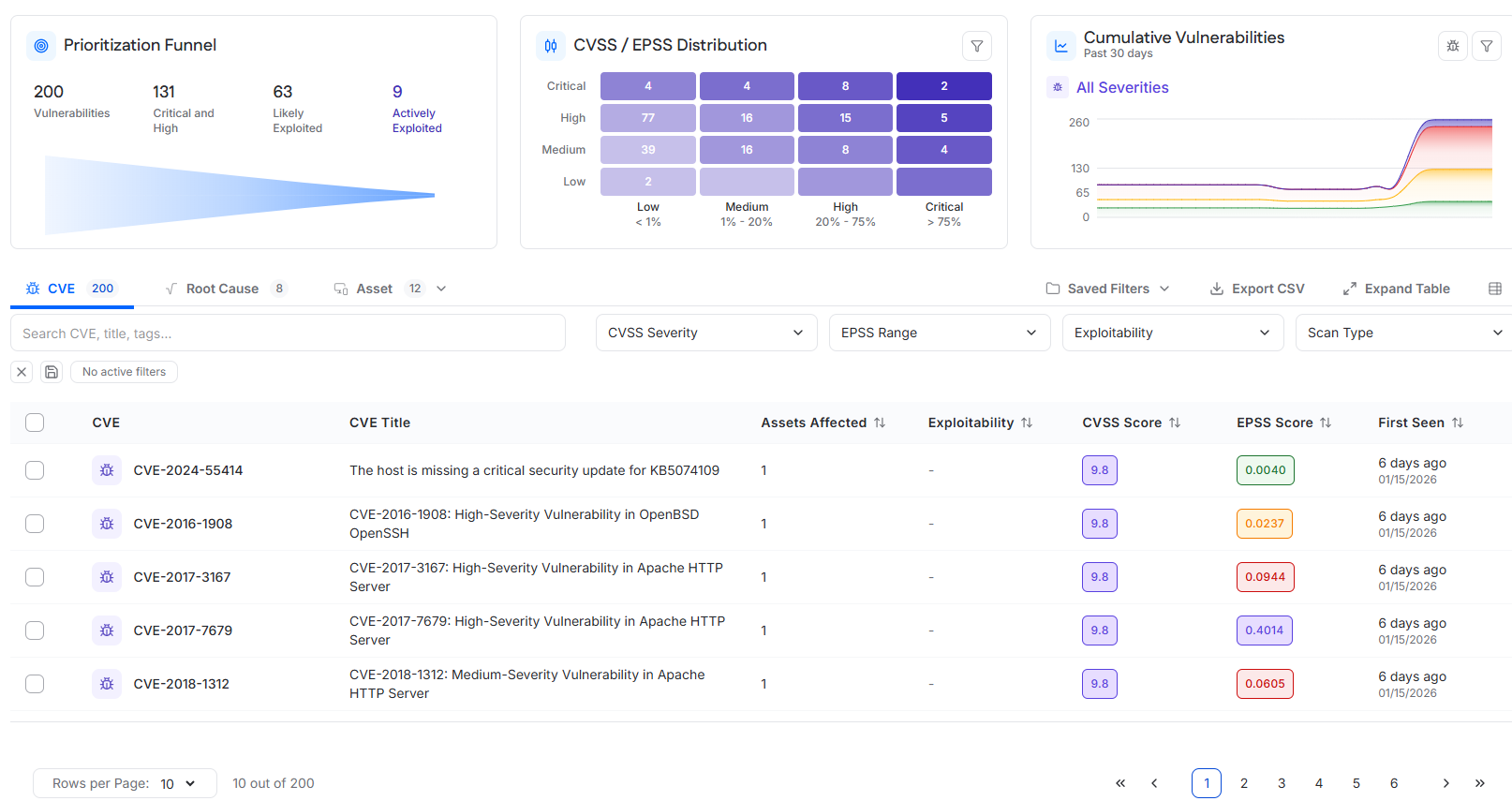
The Vulnerability Core Security module provides visibility into vulnerability risk across all scanned assets. It combines prioritization, distribution analysis, historical trending, and multiple investigative views to help users identify, understand, and remediate vulnerabilities effectively.
The module supports analysis at three levels:
Vulnerability (CVE)
Root cause
Asset
All views are interconnected, allowing users to move from high-level risk indicators to detailed, actionable findings.
Prioritization Funnel
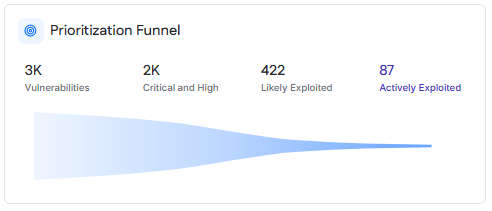
The Prioritization Funnel presents a summarized, risk-based view of open vulnerabilities across the environment. Vulnerabilities are progressively filtered using severity and exploitability criteria to highlight issues that require immediate attention.
Metrics
Vulnerabilities
Total number of open vulnerabilities across all targets.
Critical and High
Open vulnerabilities rated as Critical or High severity.
Likely Exploited
Open vulnerabilities with an EPSS score greater than 0.05, indicating a high probability of exploitation.
Actively Exploited
Open vulnerabilities that are listed in the CISA Known Exploited Vulnerabilities catalog and/or have a public proof-of-concept exploit available in Exploit DB.
CVSS / EPSS Distribution
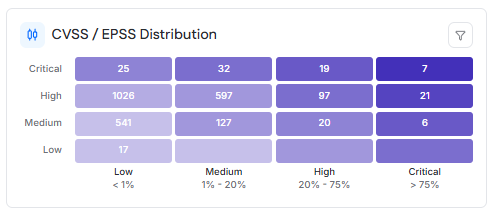
The CVSS / EPSS Distribution chart visualizes vulnerabilities based on severity and likelihood of exploitation. It provides a two-dimensional view to help identify vulnerabilities that represent the highest risk.
Chart Structure
CVSS severity is displayed on the vertical axis using the categories Critical, High, Medium, and Low.
EPSS probability ranges are displayed on the horizontal axis:
Low: less than 1 percent
Medium: 1 to 20 percent
High: 20 to 75 percent
Critical: greater than 75 percent
Each cell shows the number of CVEs that fall within the corresponding CVSS and EPSS range.
Interaction
Selecting a cell filters the CVE table to display only the vulnerabilities that match the selected severity and EPSS range.
Vulnerability Distribution
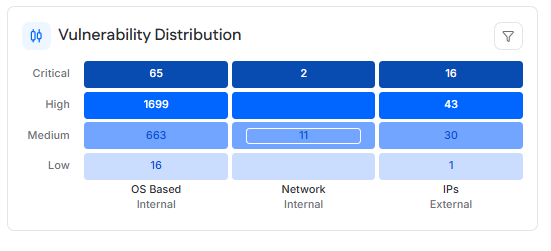
The Vulnerability Distribution chart shows how vulnerabilities are distributed across different scan types, providing insight into where vulnerabilities are being detected.
Chart Structure
Severity is displayed on the vertical axis using Critical, High, Medium, and Low.
Scan type is displayed on the horizontal axis:
OS-based internal scans
Network-based internal scans
External IP scans
Each cell shows the number of CVEs that meet both the severity and scan type criteria.
Interaction
Selecting a value filters the CVE table to display matching vulnerabilities.
Cumulative Vulnerabilities
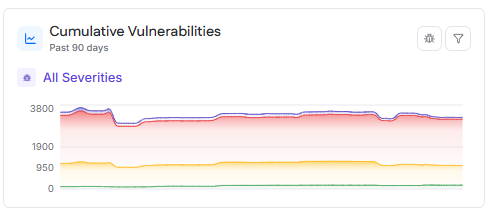
The Cumulative Vulnerabilities chart displays how the total number of open vulnerabilities changes over time. It is used to track trends and assess remediation progress.
Behavior
By default, the chart shows cumulative vulnerabilities over the past 90 days. Users can change the time range to view the last 30, 60, or 90 days.
Vulnerabilities are broken down by severity using the following color coding:
Low
Medium
High
Critical
Hovering over a data point displays the date and the count of vulnerabilities by severity, as well as the total cumulative count.
CVE Table
The CVE table lists all open CVE vulnerabilities detected across all targets. It is the primary view for reviewing and investigating individual vulnerabilities.
Table Data
Each row represents a single CVE and includes information such as the CVE identifier, description, affected asset count, exploitability indicators, CVSS score, EPSS score, and first detection date.
Filtering and Search
The table supports filtering by:
CVSS severity
EPSS score range
Exploitability
Scan type
A search field allows users to search CVEs by identifier, title, or related metadata. Pagination is available for large result sets.
CVE Details Drawer
Selecting a CVE from the table opens a drawer containing detailed information about the vulnerability.
Contents
The drawer displays the CVSS and EPSS scores, a vulnerability description, the CVSS vector, and a reference link to the CVE entry on nvd.nist.gov.
A table lists the assets currently affected by the CVE, based on authenticated scan results. This view supports filtering, pagination, and CSV export.
Root Cause Table
The Root Cause table groups vulnerabilities by their underlying cause, such as an application, runtime, or system component.
Each row aggregates all related CVEs and displays affected asset counts, highest CVSS and EPSS scores, total vulnerabilities, severity breakdown, and exploitability indicators.
This view is intended to support remediation strategies that address the source of multiple vulnerabilities.
Root Cause Details Drawer
Selecting a root cause opens a drawer that provides detailed information about vulnerabilities and assets associated with that root cause.
Vulnerabilities Tab
Displays all CVEs linked to the root cause, along with severity and exploitability information.
Affected Assets Tab
Displays the assets impacted by the root cause, including operating system, asset score, and tags. This view helps identify where remediation actions are required.
Asset Table
The Asset view presents vulnerability data from an asset-centric perspective and supports switching between internal and external assets.
Internal Assets
Lists assets that have had a successful internal vulnerability scan within the last 90 days. This includes targets of Internal Authenticated and Internal Unauthenticated scans.
External Assets
Lists assets that have had a successful external vulnerability scan within the last 90 days. This includes targets of External IP scans and Web Application vulnerability scans.
Asset Data
Each asset displays its operating system or type, asset score, total vulnerabilities, severity breakdown, and associated tags. Selecting an asset allows further investigation of asset-level vulnerabilities.