Secure Baseline
Last updated: May 5, 2026
Secure Baseline provides centralized visibility into system configuration compliance across your environment. It evaluates assets against established security benchmarks to identify misconfigurations, weak settings, and policy gaps that increase risk.
Use Secure Baseline to:
measure configuration compliance against industry benchmarks
identify failing security controls across assets
review compliance posture by benchmark or by asset
investigate configuration results for individual systems
Secure Baseline results are based on completed Secure Baseline scans and reflect the latest aggregated results across all scanned targets.
Secure Baseline supports benchmark content from:
CIS Benchmarks
DISA STIGs
Secure Baseline Overview
Secure Baseline includes two primary views:
Benchmark
Asset
Use the Benchmark view to understand how specific benchmark controls perform across applicable assets.
Use the Asset view to understand the overall Secure Baseline posture of individual systems.
Benchmark View
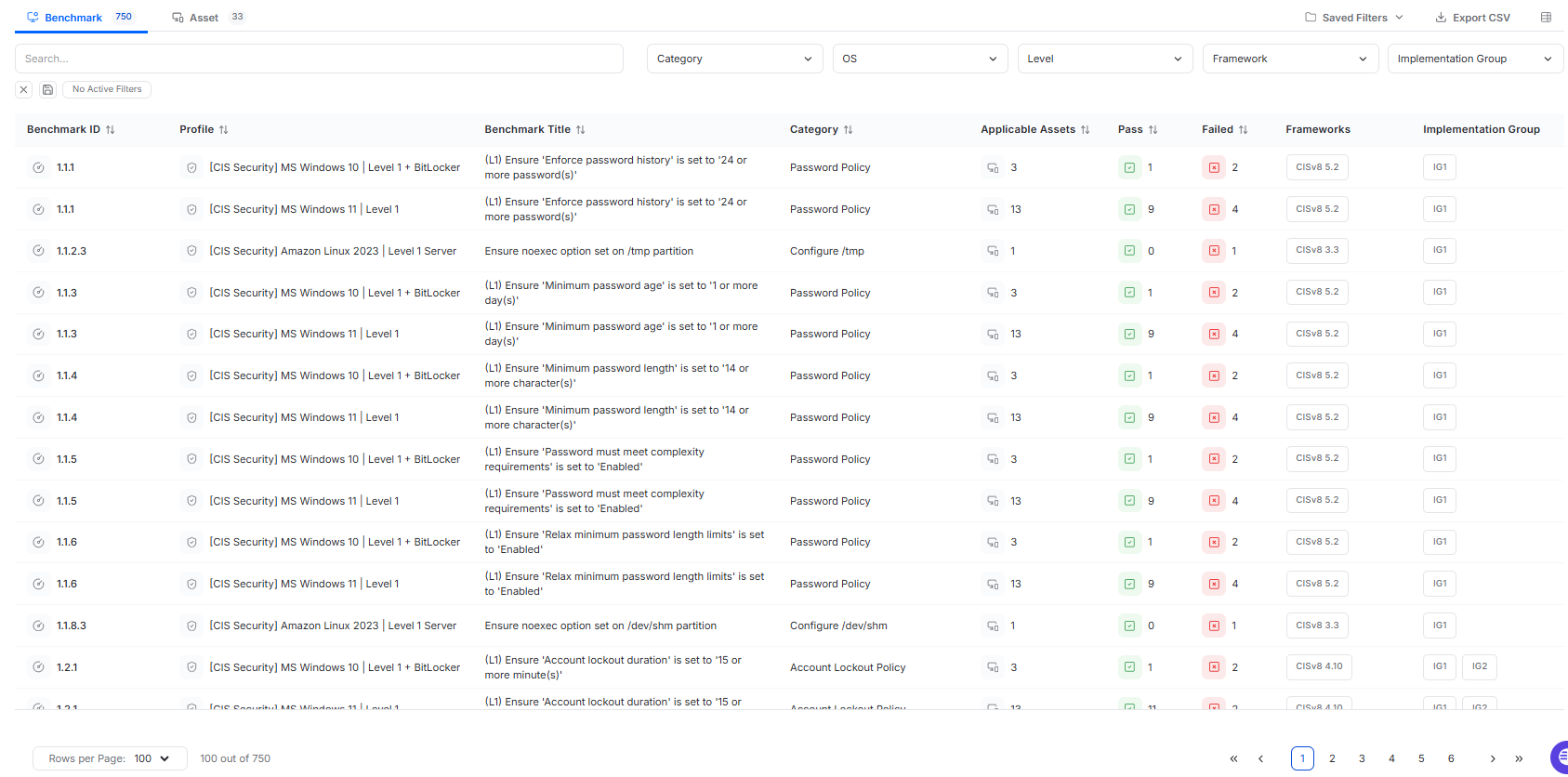
The Benchmark view provides a benchmark-centric view of Secure Baseline results. Each row represents a benchmark control that has been evaluated in a completed Secure Baseline scan.
Only benchmarks that have been evaluated in completed scans appear in this view.
The Benchmark table includes:
Benchmark ID
The identifier of the benchmark control.Profile
The benchmark profile used in scanning.Benchmark Title
The configuration requirement being evaluated.Category
The configuration domain associated with the benchmark.Applicable Assets
The number of assets where the benchmark applies. Hover over the count to view the applicable asset names.Pass
The number of applicable assets that passed the control.Failed
The number of applicable assets that failed the control.Frameworks
The associated framework, such as the CIS version, when applicable.Implementation Group
The CIS implementation group associated with the control, such as IG1 or IG2, when applicable. If implementation group does not apply, this column shows a dash.
The Benchmark view supports:
search
filters for Category, OS, Level, Framework, and Implementation Group
sorting
pagination
CSV export
Benchmark Detail Drawer
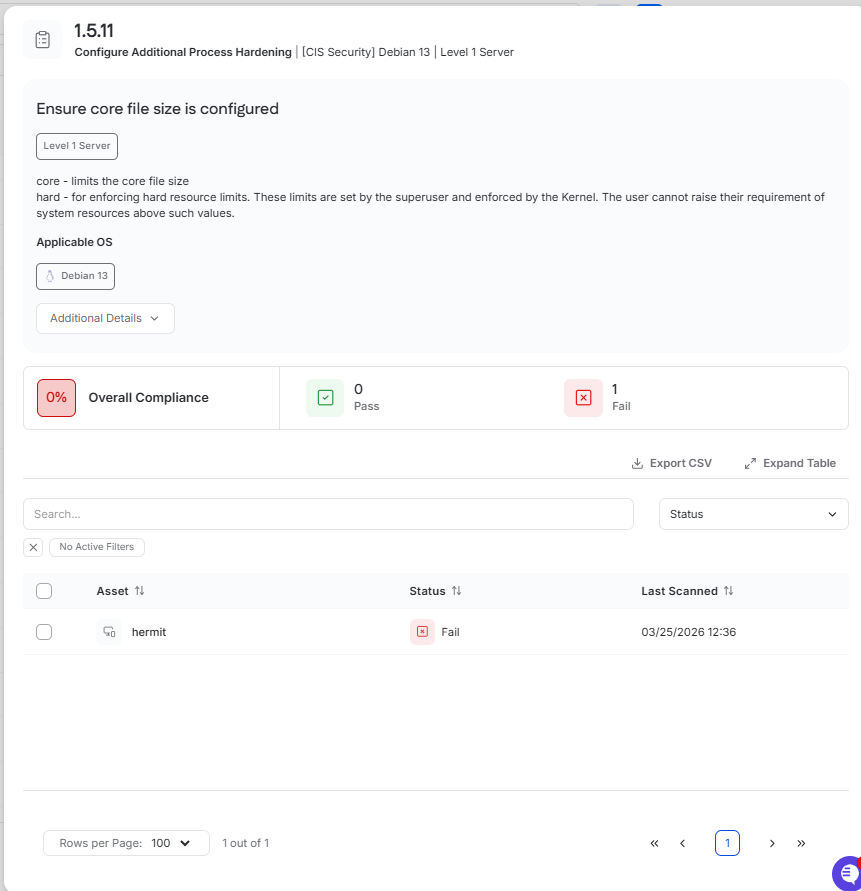
Clicking a Benchmark ID opens the benchmark drawer.
This drawer provides additional detail for the selected control, including:
the benchmark ID and title
the benchmark profile
descriptive benchmark guidance
applicable operating systems
overall compliance
pass and fail counts
The drawer also includes an Additional Details section. Depending on the benchmark, this section may include items such as:
benchmark rationale
manual remediation guidance
recommended configuration paths
impact notes
Below the summary, the drawer includes a table showing assets that failed the selected benchmark.
This table includes:
Asset
Status
Last Scanned
The benchmark drawer supports:
search
a Status filter
sorting
pagination
CSV export
Use this view to assess the impact of a specific benchmark control and identify the systems that require remediation.
Asset View
The Asset view provides an asset-centric view of Secure Baseline results. Each row represents an asset evaluated by a Secure Baseline scan.
The Asset table includes:
Asset
The asset name.OS
The operating system of the asset.Benchmark Profile
The benchmark profile used in scanning. This may be blank if the asset was not scanned.Level
The benchmark level evaluated for the asset, such as L1 or L2.Total Checks
The total number of benchmark checks evaluated on the asset.Pass
The number of benchmark checks that passed.Failed
The number of benchmark checks that failed.Compliance
The asset’s compliance percentage, shown as a color-coded percentage badge.Last Scanned
The localized date and time of the most recent Secure Baseline scan.
Some asset rows may show N/A values. This indicates the asset was not successfully scanned or was not scanned at all for Secure Baseline.
The Asset view supports:
search
filters for OS, Benchmark Profile, and Level
sorting
pagination
CSV export
Use this view to identify which systems have the weakest configuration posture and require further review.
Asset Drawer
Clicking an asset opens the asset drawer with the Configuration tab selected.
The Configuration tab shows the Secure Baseline results for that asset and includes a summary of:
overall compliance
pass count
fail count
benchmark profile
last scanned date
Below the summary, the Configuration tab includes a benchmark results table with the following columns:
Benchmark ID
Benchmark Title
Category
Status
This table supports:
search
filters for Category and Status
sorting
pagination
CSV export
Use the asset drawer to review the Secure Baseline posture of a specific system, identify failing controls, and confirm the results of remediation work.
Create a Secure Baseline Scan
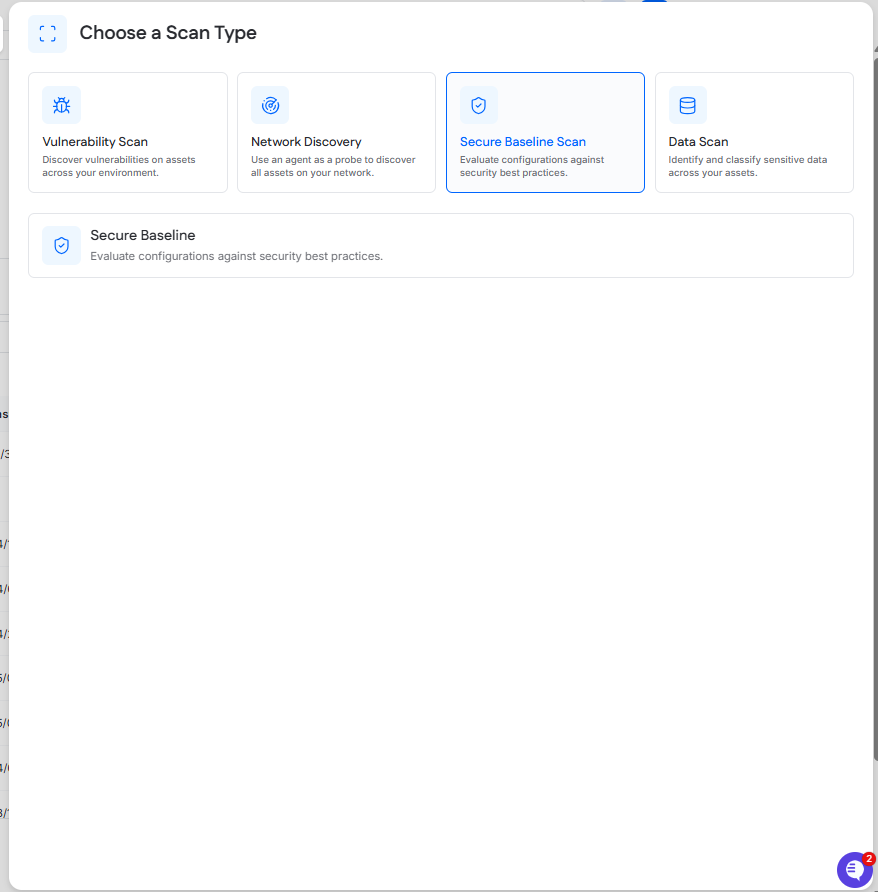
Secure Baseline scans are scheduled from the Scanning page by clicking New Scan and selecting Secure Baseline.
Completed scan results appear in Scanning > History.
Secure Baseline displays the latest aggregated results across all scanned targets.