N-able PSA Integration Guide
Last updated: September 9, 2026
Create API Key
To facilitate the connection between CYRISMA and N-able, you will need to generate an API key.
Steps to Create an API Key:
Navigate to My Account:
In the N-able user interface, click on ‘My Account’, located in your user sub-menu on the top navigation bar.
Access API Keys Tab:
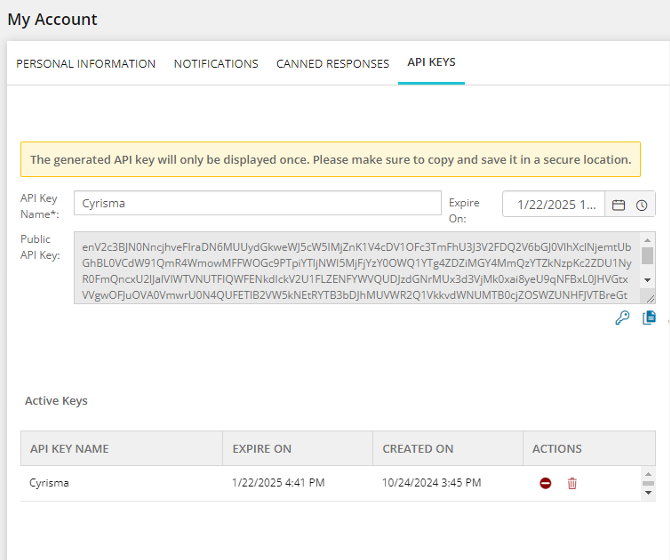
From the My Account page, navigate to the ‘API Keys’ tab.
Generate a New API Key:
Enter a meaningful name for the API key.
(Optional) Set an expiration date for the key if desired.
Click on the ‘Create API Key’ button (represented by a key icon) to generate the public API key.
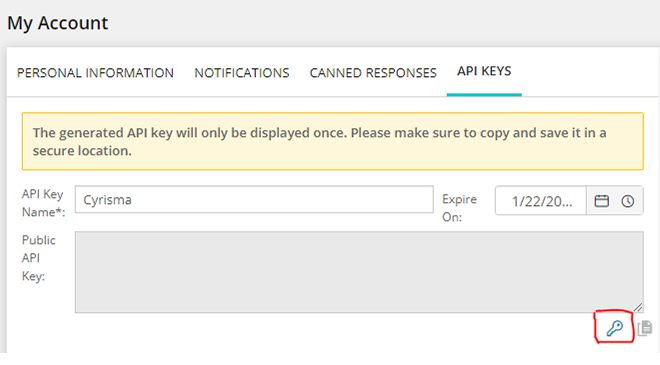
Securely Store the Key:
Once the public API key is created, be sure to store it in a secure location. It is essential to keep it safe, as it will not be shown again and is required by the CYRISMA platform to perform PSA actions.