Secure Baseline Scans
Last updated: January 15, 2026
Secure Baseline Scans evaluate system configurations against established security best practices to identify misconfigurations, weak settings, and policy gaps. These scans focus on how systems are configured, rather than on vulnerabilities in installed software.
This article explains what Secure Baseline Scans do, how they are executed, what data they collect, and how to apply them effectively.
What Secure Baseline Scans Do
Secure Baseline Scans compare operating system and security-related configuration settings against predefined secure configuration benchmarks. These benchmarks represent accepted hardening standards designed to reduce attack surface and limit misconfiguration-driven risk.
Secure Baseline Scans are commonly used to:
Identify insecure or non-compliant configuration settings
Detect configuration drift over time
Validate security hardening and policy enforcement
Support compliance and audit readiness
Complement vulnerability scanning efforts
These scans focus on configuration posture, not exploitability.
Baseline Scanning Strategy
Purpose
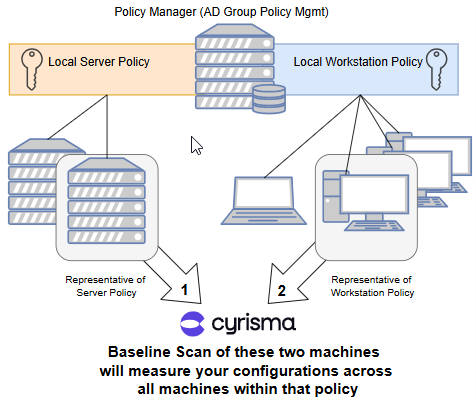
Secure Baseline Scanning is designed to establish a configuration baseline that represents the strength of your system policies. In most environments, system configurations are centrally managed using policy management platforms such as:
Active Directory Group Policy
Microsoft Intune (MDM)
Because policy-driven configurations are consistent across large groups of systems, scanning every endpoint is not always necessary.
Recommended Practice
Cyrisma Secure Baseline Scans should be run against representative systems from each policy and operating system combination.
Select representative machines for:
Each centralized policy
Each operating system governed by that policy
The results of these scans indicate configuration weaknesses within the policy for each operating system.
The total number of systems included in baseline scanning is determined by:
The number of policies
The number of operating systems within each policy
Example Scenario
Policy 1 – Corporate HQ Workstations (Active Directory Group Policy)
Windows 10 (29 workstations)
Windows 11 (51 workstations)
macOS 15 (3 workstations)
Policy 2 – East Facility Workstations (Microsoft Intune MDM)
Windows 10 (16 workstations)
Windows 11 (302 workstations)
macOS 15 (9 workstations)
Policy 3 – IT-Managed Servers (No Centralized Policy Management)
Windows Server 2019
Windows Server 2022
Debian 12
In this example:
Policies 1 and 2 each contain three operating systems
One representative system per operating system per policy should be scanned
Policy 3 has no centralized policy management, so each system should be scanned individually
Although there are 404 total systems, scanning only 9 representative systems is sufficient to establish a meaningful configuration baseline.
Ongoing Scanning Guidance
Secure Baseline Scans do not need to run daily or weekly.
A new baseline scan should be run when:
Cyrisma releases an updated baseline configuration
The policy applied to systems is improved, modified, or replaced
Configuration weaknesses identified in a previous scan have been mitigated
Re-running a baseline scan after these changes allows you to measure the strength and compliance of the updated policy.
Between policy or baseline changes, configurations typically remain static, and additional scans provide limited new insight.
Secure Baseline File Versions
Secure Baseline Scans rely on versioned baseline definition files that are updated periodically by Cyrisma. Each baseline file includes a version number and release date.
The table below lists the currently available baseline versions.
Published Secure Baseline Versions
Operating System | Baseline Version | Release Date |
Centos 7 | v4.0.0 | 25-Aug |
Centos 8 | v2.0.0 | 25-Oct |
Debian 10 | v2.0.0 | 25-Oct |
Debian 13 | v1.0.0 | 26-Jan |
macos 11 | v4.0.0 | 25-Oct |
macos 12 | v4.0.0 | 25-Oct |
Macos 13 | v3.0.0 | 25-Dec |
Macos 14 | v3.0.0 | 25-Dec |
Macos 15 | v2.0.0 | 25-Dec |
Macos 26 | v1.0.0 | 25-Dec |
oracle 7 | v4.0.0 | 25-Oct |
oracle 8 | v4.0.0 | 25-Oct |
oracle 9 | v2.0.0 | 25-Oct |
red hat 7 | v4.0.0 | 25-Oct |
red hat 8 | v4.0.0 | 25-Oct |
suse 12 | v3.2.1 | 25-Oct |
suse 15 | v2.0.1 | 25-Oct |
ubuntu 18.04 | v2.2.0 | 25-Oct |
ubuntu 20.04 | v3.0.0 | 25-Oct |
ubuntu 22.04 | v3.0.0 | 25-Jun |
Windows 10 (Intune) | v4.0.0 | 25-Jun |
Windows 10 (Enterprise) | v4.0.0 | 25-May |
Windows 11 (Intune) | v4.0.0 | 25-May |
Windows 11 (Enterprise) | v4.0.0 | 25-Sep |
Windows 2012 | v3.0.0 | 25-Oct |
Windows 2012 | v3.0.0 | 25-Oct |
Windows 2016 | v4.0.0 | 25-Oct |
Windows 2019 | v4.0.0 | 25-Jul |
Windows 2022 | v4.0.0 | 25-Jul |
Execution Model
Secure Baseline Scans are designed to run using agent-based scanning.
A scan agent is installed directly on each target system
Each system evaluates its own configuration locally
This approach provides the highest accuracy and reliability
Secure Baseline Scans are not intended to be centrally executed from a single sensor across multiple systems. Using a single agent to remotely evaluate many targets may result in incomplete or inconsistent findings due to permission and visibility limitations.
Credential Behavior
Local scans:
No credentials required
The agent evaluates its own system
Remote scans (where supported):
Credentials are required
Results may vary depending on permission scope
For consistent and complete results, local agent-based scanning is strongly recommended.
Supported Platforms
Secure Baseline Scans are supported on:
Windows systems
macOS systems
Linux systems (where applicable)
Available baseline checks vary by operating system.
Secure Baseline Profiles
Secure Baseline Scans use baseline profiles to determine which benchmark standard is applied during evaluation.
Default Baseline Profile
All new targets default to the CIS (Center for Internet Security) baseline profile
CIS is the most commonly used standard and is suitable for most environments
Alternative Baseline Profiles
Some environments may require a different benchmark standard, such as DISA STIG.
Changing the Secure Baseline Profile for a Target
You can change the Secure Baseline Profile applied to a specific target when a different compliance framework is required.
Key points to understand:
The baseline profile is configured per target
There is no global default override
The selected profile applies to all future baseline scans for that target
Once changed, all Secure Baseline Scans for that target will evaluate configuration settings against the newly selected benchmark.
Important Considerations
Each new target must be configured individually if a non-default profile is required
Bulk configuration of baseline profiles is not currently supported
Most customers continue to use CIS, which is why it remains the default
If repeated manual configuration is required, consider documenting baseline profile selection as part of your target onboarding process.
Data Collected
Secure Baseline Scans collect system configuration data only, including:
Operating system security settings
Local policy and configuration values
Service and feature enablement status
Authentication and access control settings
Logging and auditing configuration
Encryption and protection-related settings
These scans do not perform exploit testing or software vulnerability detection.
Secure Baseline vs. Vulnerability Scans
Secure Baseline Scans | Vulnerability Scans |
Evaluate configuration settings | Identify software vulnerabilities |
Focus on hardening and policy | Focus on CVEs and patches |
Detect misconfigurations | Detect exploitable flaws |
Support compliance initiatives | Support remediation workflows |
Both scan types are essential and should be used together.
Prerequisites
To run Secure Baseline Scans successfully:
A scan agent must be installed on the target system
Endpoint protection must allow agent activity
Systems must be online during scanning
Sufficient permissions must exist for configuration inspection
Performance Considerations
Secure Baseline Scans are lightweight
Minimal impact on system performance
Scan duration depends on OS type and number of configuration checks
Common Limitations
Baseline checks are OS-specific
Some configuration settings may be inaccessible due to permissions
Results reflect system state at the time of scanning
Business-specific exceptions are not automatically inferred
Best Practices
Deploy agents locally on systems for baseline scanning
Run baseline scans regularly to detect configuration drift
Pair baseline scans with vulnerability scans for full coverage
Review findings in the context of operational requirements
Re-scan after configuration or policy changes
Representative Device Selection
As a best practice, consider running Secure Baseline Scans on a single representative system—or a small group of systems—for each operating system type. In many environments, baseline configurations are standardized across similar devices, making it unnecessary to scan every endpoint to identify configuration posture. This approach helps reduce operational overhead while still providing meaningful visibility. Full coverage can still be used where configurations vary or higher assurance is required.